Proxy Protocol
The PROXY protocol provides a means of passing connection information between layers of the proxy infrastructure. Without the PROXY protocol, Traffic Server would only have connection information from the previous hop connecting to Traffic Server and not the actual originating client connection information. This can be done over either HTTP or TLS connections.
Note
While Traffic Server supports receiving and processing TLV Version 2 formatted payloads, it does not support sending them.
The Proxy Protocol must be enabled on each port for which connections with the
Proxy Protocol header are expected. See
proxy.config.http.server_ports for information on how to enable the
Proxy Protocol on a port. Once enabled, incoming requests may be prefaced with
either the PROXY v1 or v2 header. Any request not prefaced by this header will
be handled according to the other directives in the associated port
configuration.
As a security measure, an optional list of trusted IP addresses may be
configured with proxy.config.http.proxy_protocol_allowlist.
Important
If the allowlist is configured, requests will only be accepted from these IP addresses for all ports designated for Proxy Protocol in the
proxy.config.http.server_portsconfiguration, regardless of whether the connections have the Proxy Protocol header.
By default, Traffic Server uses client’s IP address that is from the peer when it applies ACL. If you configure a port to
enable PROXY protocol and want to apply ACL against the IP address delivered by PROXY protocol, you need to have PROXY in
proxy.config.acl.subjects.
If you specify the server_ports flag pp-clnt then the client IP address used for the transaction will be the one provided by proxy protocol.
The pp-clnt flag governs whether the operator-visible “client IP” is the
PROXY-Protocol source address rather than the immediate TCP peer for the
following surfaces:
The squid log field
%<chi>(and its derivatives%<chp>/%<chh>).TSHttpTxnClientAddrGet(),TSHttpSsnClientAddrGet(), andTSNetVConnClientAddrGet()(the plugin-visible client address).SNI ACL evaluation, the HTTP/2
PEERACL, SSL diagnostics, and client-certificate validation.Outbound transparency: when binding the proxy’s outbound socket to the client’s address (
addr_binding = FOREIGN_ADDR), Traffic Server binds to the PROXY-Protocol source address only whenpp-clntis in effect.HostDB parent-selection affinity: the consistent-hash key that groups requests onto the same upstream peer is the PROXY-Protocol source only when
pp-clntis in effect; otherwise it is the immediate TCP peer.
The new log field %<rchi> (and its derivatives %<rchp> /
%<rchh>) always reports the immediate TCP peer regardless of
pp-clnt.
HTTP Forwarded Header
The client IP address in the PROXY protocol header is passed to the origin server via an HTTP Forwarded: header. See proxy.config.http.insert_forwarded for configuration information.
Detection of the PROXY protocol header is automatic. If the PROXY header
precludes the request, it will automatically be parse and made available to the
Forwarded: request header sent to the origin server.
The legacy outbound headers Client-ip:
(proxy.config.http.insert_client_ip) and X-Forwarded-For:
(proxy.config.http.insert_squid_x_forwarded_for) likewise carry
the PROXY-Protocol source address whenever a PROXY-Protocol header is
present, mirroring the Forwarded: for= parameter. This behavior is
independent of the pp-clnt listener flag.
Outbound PROXY protocol
See proxy.config.http.proxy_protocol_out for configuration information.
Example
As an example, consider the following topology:
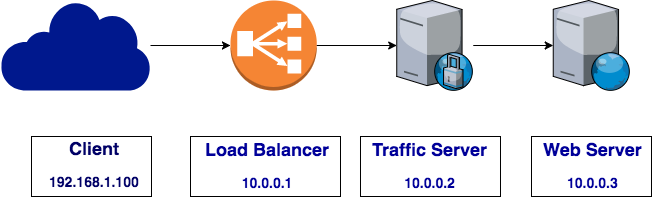
PROXY protocol header flow
Without the PROXY protocol header, the client IP would only be reported
accurately to the Load Balancer. Traffic Server would only see the connection from the
Load Balancer. Similarly, the Web Server would only see the connection from
Traffic Server. In the example above, if the client initiated a TLS connection, the Web
Server would see the connection originating from Traffic Server at 10.0.0.2:
Forwarded: for=10.0.0.2;by=10.0.0.1;proto=https;host=test000001.com
If the Load Balancer has the Proxy Protocol enabled, requests sent through the
Load Balancer will be preceded with the PROXY header. Traffic Server will detect the
PROXY header and transform that into the Forwarded: HTTP header if configured to
insert the Forwarded: header with the for parameter. In the example above,
if the client initiated a TLS connection, the Web Server can use the Forwarded:
header to determine the TLS connection originated from the client at 192.168.1.100:
Forwarded: for=192.168.2.100;by=10.0.0.2;proto=https;host=test000001.com